AI authorship note: I created this article with AI assistance. I provided the experience and source material, directed the research and drafting, checked the technical claims and approved the final text.
Summary: A regression in Veeam Backup & Replication 13.1 causes Backup Copy jobs targeting a Cloud Connect repository to fail with
RevocationStatusUnknownwhen the Windows certificate revocation cache is empty. Veeam fixed it in build 13.1.1.18. This post follows the investigation, including two conclusions I reached along the way that turned out to be wrong.
After upgrading a Veeam Cloud Connect environment and a tenant Veeam Backup & Replication server from version 13 to 13.1, backup copy jobs continued to run normally for six days. They then started failing overnight, without a certificate renewal, configuration change or network change at the time of failure.
The upgrade shaped my initial investigation. I discounted it partway through, wrongly, and only the vendor’s changelog settled it. I have kept the timing here because it explains what I checked and why.
The tenant could no longer establish a connection to either of two independent Cloud Connect gateways. The logs reported:
The remote certificate was rejected by the provided
RemoteCertificateValidationCallback.
(System.Security.Authentication.AuthenticationException)

Failed to establish a connection to the Cloud Provider.
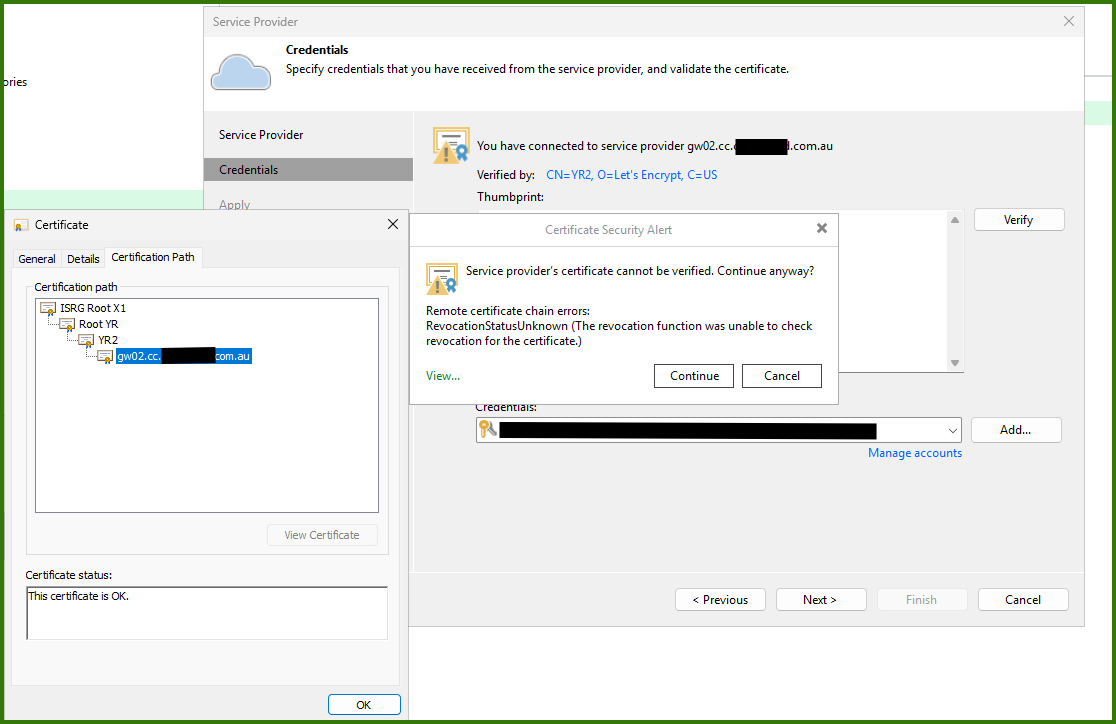
Stepping through the Service Provider properties produced a more specific warning:
Remote certificate chain errors:
RevocationStatusUnknown
(The revocation function was unable to check revocation for the certificate.)
The certificate chain
The affected gateway used a Let’s Encrypt certificate issued through the Generation Y hierarchy. Its chain was:
Gateway certificate
  -> Let's Encrypt YR2
  -> ISRG Root YR, cross-signed by ISRG Root X1
  -> ISRG Root X1
At the time of the investigation, Let’s Encrypt listed Root YR as not yet included in root-program trust stores and showed the default YR2 chain terminating at ISRG Root X1.[1] Validation therefore depended on the cross-signed Root YR certificate linking the chain back to the trusted ISRG Root X1.
The warning pointed towards revocation checking, so that is where I started. I checked the obvious causes before changing Veeam’s certificate-validation behaviour:
- The certificate was current and its subject alternative name matched the gateway.
- ISRG Root X1 was trusted and the Windows disallowed store was empty.
- The YR2 certificate, cross-signed Root YR and certificate revocation list URLs were reachable, including from the SYSTEM context used by Veeam services.
- The certificate revocation list was current.
- Both Cloud Connect gateways showed the same failure, which pointed towards a tenant-side factor rather than one incorrectly configured gateway.
- Both Generation Y certificates were already present in the machine intermediate store on the service-provider side.
I also renewed the certificate on one gateway as a remediation attempt. It did not help.
Windows and Veeam disagreed
The confusing part was that Windows validated the certificate successfully on the affected tenant server at the same time Veeam rejected it.
certutil -urlcache * delete
certutil -verify -urlfetch C:\temp\gateway.cer
The four chain elements all returned dwErrorStatus=0, and the leaf certificate’s revocation check passed. The Windows certificate dialog also reported This certificate is OK, while the Veeam wizard displayed RevocationStatusUnknown for the same certificate.
That result ruled out a simple expired, mismatched or generally untrusted certificate. It also meant I was dealing with a difference in service context, chain construction or validation policy rather than accepting the warning at face value.
I worked through the investigation with Claude. It helped me organise the hypotheses, interpret the certificate output and keep track of what each test did or did not exclude. I still ran the commands in the affected environment, checked the certificate stores under the correct service context and decided which changes were safe to make.
One important trap was that certutil -verify -urlfetch can fetch missing certificates and populate the current user’s cache. A successful interactive test does not prove that a service running as SYSTEM already has the same certificate material available. I cleared the URL cache before checking the store state and repeated network tests in the SYSTEM context.
The first half of the fix
The tenant VBR server’s LocalMachine\CA store did not contain YR2 or the cross-signed Root YR certificate. I downloaded the two certificates from Let’s Encrypt, checked their fingerprints and installed them in the machine Intermediate Certification Authorities store.
Invoke-WebRequest `
  https://letsencrypt.org/certs/gen-y/int-yr2.der `
  -OutFile C:\temp\int-yr2.der

Invoke-WebRequest `
  https://letsencrypt.org/certs/gen-y/root-yr-by-x1.der `
  -OutFile C:\temp\root-yr-by-x1.der

certutil -dump C:\temp\int-yr2.der |
  Select-String 'Cert Hash\(sha1\)'

certutil -dump C:\temp\root-yr-by-x1.der |
  Select-String 'Cert Hash\(sha1\)'
The SHA-1 certificate fingerprints I verified on 12 August 2026 were:
YR2
2D74D6DFD96EEA55AD7BAAFA0D3C6552B2DADC37

Root YR, cross-signed by ISRG Root X1
AB9D0263244DD0326EB67015705A667E79CFE998
Certificate fingerprints and download locations can change when certificate authorities rotate their hierarchy. Check them against Let’s Encrypt’s current certificate information before using these commands.
I then installed both certificates in CA, not Root:
certutil -addstore -f CA C:\temp\root-yr-by-x1.der
certutil -addstore -f CA C:\temp\int-yr2.der

Restart-Service VeeamBackupSvc
The cross-signed Root YR belongs in the intermediate store in this chain because ISRG Root X1 signs it. Installing it as a trusted root would change the intended trust relationship.
After this change, the Certificate Security Alert no longer appeared when I stepped through the Service Provider properties. Chain construction on the VBR server was fixed.
The Service Provider rescan still failed with the same callback exception.
The component the logs did not identify
The tenant also had a separate repository/proxy server. Its LocalMachine\CA store was empty too.
The failure trace on the backup server showed only backup-server threads connecting to the gateway. It did not name the repository/proxy, and no separate log appeared during that rescan window. Based on the logs, I initially concluded that the repository was not involved.
That conclusion was wrong.
I installed the same YR2 and cross-signed Root YR certificates in LocalMachine\CA on the repository/proxy and restarted the Veeam services there.
After that:
- The Service Provider properties completed without the certificate warning.
- The Service Provider rescan succeeded against both Cloud Connect environments.
- The Cloud Connect repository rescan succeeded.
Installing the certificates on the VBR server alone was not enough. The repository/proxy connected to the gateway and performed TLS validation using its own machine certificate stores, even though the exception surfaced through the backup server without naming that host.
Cached connections masked the fix
The successful rescans showed that certificate validation was working, but one backup copy job still failed with the original callback exception. At first this made it look as though part of the certificate problem remained.
The logs showed that the job was using a cached cloud connection established before the certificates were installed. Its connection attempt had been running for more than 45 minutes and eventually failed as a TCP timeout rather than performing a fresh certificate validation.
I restarted the Veeam services on the tenant backup server to clear the cached cloud connection, then confirmed that no sessions were left running before retrying the job.
Get-Service Veeam* | Stop-Service -Force
Get-Service Veeam* | Start-Service

Get-VBRSession |
  Where-Object { $_.State -ne 'Stopped' } |
  Select-Object JobName, State, CreationTime
After the restart, the backup copy job completed successfully. Both copy jobs, the Service Provider rescans and the Cloud Connect repository rescans were then confirmed working with revocation checking still enabled.
For this fault, installing the certificates fixed the underlying validation problem, but restarting the Veeam services on the backup server was still a required final step. A reboot would also clear the cached connections.
A log timestamp trap
One other detail slowed the investigation. Searching for recently modified Veeam logs returned nothing even while Svc.VeeamBackup.log was receiving new entries.
Veeam holds log files open and buffers writes, so filesystem LastWriteTime can lag behind the timestamps of entries already visible in the file. I read the log contents directly and checked the per-job folders under C:\ProgramData\Veeam\Backup rather than relying on file modification times to locate the active log.
What I would check first next time
For the same error, I would start by identifying every tenant-side component that can connect directly to a Cloud Connect gateway. I would then check Cert:\LocalMachine\CA on each one, under the service context where practical.
Get-ChildItem Cert:\LocalMachine\CA |
  Where-Object Subject -match "Let's Encrypt|ISRG" |
  Format-List Subject, Issuer, Thumbprint
I would also keep these points in mind:
RevocationStatusUnknowndid not clearly describe the fault in this case. The message is accurate but points at revocation infrastructure rather than at the product behaviour causing it.- A clean
certutil -verify -urlfetchresult can hide the original condition because the command actively downloads certificate material. - The VBR server is not necessarily the only machine performing validation. Check repositories and proxies as well, even if their hostnames do not appear in the visible exception.
- Restart the Veeam services on the tenant backup server after changing the certificate stores on all connecting components. Otherwise, cached cloud connections may continue returning the original error.
- Read active Veeam logs directly. Do not depend on
LastWriteTimeto identify which log is receiving entries. - Do not disable revocation checking before proving whether chain construction, service context or network access is the real problem.
Installing the intermediates on both machines cleared the warning, restored the rescans and allowed both backup copy jobs to complete. That is where I stopped, and it is where I should not have. Removing the AIA-fetch dependency during chain assembly is worth doing and it did restore one environment, but it was not the cause. Treating a working system as a solved one cost me another day. The second environment failed again within hours. See the update below.
I still cannot prove why AIA-based chain construction worked for six days and then stopped. A cached AIA result expiring would fit the timing, but that remains a possible explanation rather than a demonstrated cause.
Update, 13 August 2026: the real cause
The morning after publishing, the second Cloud Connect environment was still failing. The tenant server had been rebooted, the intermediates were installed and verified on every tenant-side component, and TCP connectivity to the gateway was fine. The first environment continued working normally.
Two environments, same tenant, same certificate authority, same intermediate and same machine certificate stores, but different outcomes. Whatever the difference was, the certificate chain was not it.
Watching the validator live
Searching the log after the fact had only ever returned .NET stack traces. Tailing it live while triggering a rescan surfaced something new: the validator’s own error handler.
[13.08.2026 08:21:33.153] <145> Info (2)     Connection to Cloud Gate has been successfully established.
[13.08.2026 08:21:33.182] <164> Warning (2)  [CertificateError] Validation complete with warnings:
[13.08.2026 08:21:33.182] <164> Warning (2)  Remote certificate chain errors:
[13.08.2026 08:21:33.182] <164> Warning (2)  RevocationStatusUnknown
[13.08.2026 08:21:33.184] <145> Error (1)    The remote certificate was rejected by the
                                             provided RemoteCertificateValidationCallback.
Get-Content C:\ProgramData\Veeam\Backup\Svc.VeeamBackup.log -Wait -Tail 0
RevocationStatusUnknown was the only chain error. No PartialChain, no UntrustedRoot, and the TCP connection established successfully. With the intermediates confirmed present, chain assembly was not the problem. Revocation was the problem, exactly as the message had said all along.
The difference between the two environments
Each certificate referenced a different CRL shard from the same Let’s Encrypt intermediate. Checking the Windows CryptoAPI URL cache under the SYSTEM account, which is the context the Veeam service runs as, showed one shard cached and the other not:
certutil -urlcache http://yr2.c.lencr.org/4.crl
  -> WinHttp Cache entries: 1

certutil -urlcache http://yr2.c.lencr.org/47.crl
  -> no entry
The working environment’s shard was cached. The failing one’s was not.
Access was not the constraint. Both downloaded successfully as SYSTEM from the same host, at similar size and speed, with no proxy configured:
http://yr2.c.lencr.org/4.crl   -> HTTP 200, 140 KB, 0.45s
http://yr2.c.lencr.org/47.crl  -> HTTP 200, 145 KB, 0.65s

netsh winhttp show proxy       -> Direct access (no proxy server)
Confirming it
With the environment still failing, I exported its gateway certificate and ran a verification as SYSTEM. -urlfetch retrieves and caches the CRL as a side effect:
certutil -verify -urlfetch C:\temp\gateway.cer
It passed cleanly. Every chain element returned dwErrorStatus=0, the Leaf certificate revocation check passed, and the cache was now populated:
certutil -urlcache http://yr2.c.lencr.org/47.crl
  -> WinHttp Cache entries: 1
I then retried the Service Provider rescan with nothing else changed. No service restart, no configuration change, no certificate change.
It succeeded on the first attempt, after failing continuously for more than twelve hours including across a full server reboot.
What this means
Veeam’s Cloud Connect validator appears to read the Windows CryptoAPI CRL cache but not populate it. When the CRL is absent from the cache, validation fails closed even though the CRL is published, current and downloadable from that host seconds later.
That explains every observation:
| Observation | Explanation |
|---|---|
| Worked for six days, then failed overnight | Cache entry populated on first use, then lapsed |
certutil -verify -urlfetch always passed | -urlfetch performs the fetch the service will not |
| One environment worked, the other did not | One shard cached, the other not |
| Failure survived a reboot | The cache gap persists across restarts |
| Revocation data always current and reachable | Availability was never the issue. Retrieval by the service was. |
It also explains why the intermediates appeared to fix things. They removed a real dependency on AIA fetching during chain assembly, and the environment I tested happened to have its CRL cached. I had one system working and read that as confirmation, while the other system was still failing and telling me otherwise.
Options
Two interim options if you cannot patch immediately. Patching to 13.1.1.18 is the actual fix, covered in the next section.
Prime the cache on a schedule. Keeps revocation checking enabled. Run as SYSTEM against each gateway certificate, more frequently than the cache lifetime:
certutil -verify -urlfetch C:\temp\gateway.cer
Register it as a scheduled task running as SYSTEM. Requires a stored copy of each gateway certificate and re-priming after each renewal.
Or disable the revocation check. A registry value under HKLM\SOFTWARE\Veeam\Veeam Backup and Replication\:
CloudConnectCRLCheckMode (DWORD) = 2
Restart the Veeam Backup Service afterwards. Veeam support confirmed in response to my case that value 2 is supported for this specific error. It ignores OfflineRevocation and WarningRevocationStatusUnknown while still failing on PartialChain, so genuine chain problems are still caught. It weakens revocation checking and I would use it only as a temporary workaround until the patch can be applied.
Installing the Generation Y intermediates is still worth doing on every tenant-side component regardless. It removes the chain-assembly dependency on AIA fetching, and it costs nothing.
What I would add to the checklist
- Check the CryptoAPI CRL cache under the SYSTEM account, not just whether the CRL is reachable.
certutil -urlcache <crl-url>answers a different question fromInvoke-WebRequest <crl-url>, and only the first one reflects what the service can see. - A fix that makes the symptom disappear is not the same as a fix that addresses the cause. If one system recovers and another does not, the one still failing is the more informative of the two.
Update: Veeam fixed it in 13.1.1.18
Veeam shipped the fix while I was still working on it.
Build 13.1.1.18 was released on 12 August 2026. I am in GMT+10, so the release and my investigation overlapped. It would not have helped me on day one, but it would have saved me most of day two.
From KB4738, under Cloud Connect resolved issues:
After upgrading a tenant deployment to 13.1, Backup Copy jobs targeting a Cloud Connect repository fail when the service provider uses a publicly trusted SSL certificate and the certificate revocation cache is empty.[2]
That is this issue, described more concisely than I managed in two days.
What it corrects
It is a 13.1 regression. I raised the upgrade as a suspect on the first day and then discounted it, because backups ran for six days afterwards without trouble. That reasoning was wrong, and I should have been more explicit with myself about why I found it convincing. The revocation cache was warm during those six days. When it lapsed, the regression became visible. Installing or rearranging intermediate certificates would not have prevented it.
It is not specific to Let’s Encrypt. The changelog says “publicly trusted SSL certificate” without qualification. Let’s Encrypt was relevant in this environment because it retired OCSP in August 2025 and now publishes revocation information through CRLs. That made the CRL cache central to the failure I observed, but the fault is not conditional on the certificate authority. I had started to assume it was.
The cache observation was right, but the conclusion drawn from it was not. The CRL cache genuinely is the trigger, and priming it genuinely does resolve the failure. What I got wrong was inferring long-standing product behaviour from that, when the correct inference was a recent regression.
Applying the patch
Patch the tenant backup server to 13.1.1.18. The patch is available from KB4738 as an ISO or EXE and applies to existing 13.1.0.411 deployments only.
Unblock the ISO before running it:
Unblock-File -Path "C:\Path\To\VeeamBackup&Replication_13.1.1.18_20260812_patch.iso"
A reboot may be required. If you use Veeam Backup Enterprise Manager, patch that first.
Afterwards, remove the interim workaround if you applied it:
Remove-ItemProperty `
  -Path 'HKLM:\SOFTWARE\Veeam\Veeam Backup and Replication\' `
  -Name 'CloudConnectCRLCheckMode'

Get-Service Veeam* | Stop-Service -Force
Get-Service Veeam* | Start-Service
Note that Restart-Service VeeamBackupSvc fails when dependent services are running. Use -Force, or cycle all Veeam services as above.
What I would add to the checklist
- Check the vendor’s release notes again partway through a long investigation, not only at the start. The patch for this was dated 12 August in Veeam’s timezone, which overlapped with my own investigation in GMT+10, so it would not have helped me on day one. It would have saved me most of day two.
- When you suspect a version change early and then discount it, write down what evidence would change your mind. “It worked for six days afterwards” felt conclusive at the time, and it was not evidence of anything except a warm cache.
- A correct observation can still support a wrong conclusion. The cache finding was sound. The inference that it reflected long-standing behaviour, rather than a recent regression, was not.
Sources
[1] Let’s Encrypt certificates
[2] Veeam KB4738: Release Information for Veeam Backup & Replication 13 and Updates